

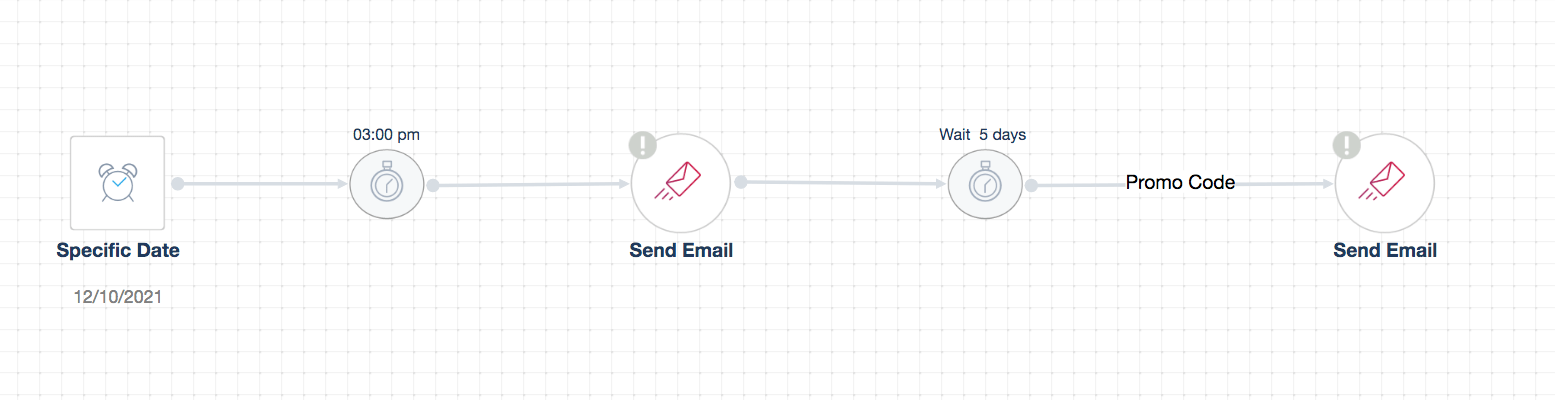
Offer messages are those that are triggered on a daily, weekly, monthly or yearly basis for the purpose of promoting certain products. Examples of offers are those sent at the end of each season, during holidays, occasions, etc…
Ecommerce companies use offers to encourage prospects to buy, retain existing customers and boost their sales. It is critical to take into consideration the two following factors when building the workflow automation for this campaign:
1. Timing
As offer campaigns can vary by holidays, seasonal, monthly or weekly, identifying the appropriate time to trigger promotional messages is critical to maximize conversions.
For instance, customers should be informed about a special offer for Christmas at the beginning of December or at least a few weeks before the holidays.
2. Segmentation
Segmenting your customers according to specific criteria such as geographic, demographic, interest or behavior depends on the occasion. For example, if you want to blast a campaign for Thanksgiving, you should take into consideration to target U.S. customers only
Another factor is promoting offers to customers based on their behaviors such as those who are price conscious or have not engaged with your product for a certain period of time.
To create a workflow automation, you need to choose “Specific Date” as a trigger and send your offer emails according to the chosen date.
In order to find out whether or not they respond to your offer, you can create a coupon or promo code. Then, you set a five-day time delay before sending the next email; you also have to specify a condition that if “Promo Code is Not Redeemed”, send another email reminder.
** Note: Your automation will not work properly if you do not clearly set up all the required conditions.